

product design
Aesi
The Backstory
This project is a collaboration with two other peers from the cohort. We worked together in the initial phase of the project to strategise an interview, conduct research and process the collected data to ideate and develop a combination of decided upon ideas.
Aesi would not have come about without the initial design and development of the collaborative effort for Aura. Aesi shares the foundation and overarching intention that the product Aura is built on.
However, it is the result of critical analysis of the product, iterated to take a new form that could be more easily integrated into the everyday life of a user.


User Interviews
A total of ten people were interviewed using an interview guide that the team prepared.
In the three interviews I conducted, I established the context of what we were about to engage in and treated it as a conversation to encourage participation.
The guide was helpful as I was able to steer the dialogue back to the data I was after.

Affinity Diagram
Data collected from the interviews was grouped based on similarity of subject followed by analysis to identify any emerging patterns such as while most users preferred calling as a method of communication, however they found it challenging to find gaps in schedules.
We then phrased our areas of concern as questions that the identified patterns answered.
Though time intensive, this exercise proved to be extremely helpful in discovering issues and pain points we would design for. It helped extract bias and validated the need for a solution.

Persona Development
The team came up with three overarching archetypes of users for the design solution.
After establishing a template with relevant attributes of the user, we went back to our individual drawing boards to deep dive and develop a persona each.
Post this, we came together to discuss the variety of users.
This collaborative approach helped us shed personal opinions and broadened our perspective in understanding how different people communicate.


Inferences
The team made inferences to arrive at user pain points.
These comprise of suggestions, emotional responses and challenges that the user faces in communicating effectively with family.
Design Ideas
Inferences in mind, the team came up with individual ideas, identified similar ones and grouped them into a number of collective ideas.
This bank of ideas offered an opportunity to explore multiple singular ideas and combinations of ideas.


Ideation
Post discussions, the team agreed upon three combinations of ideas to cater for the design solution.
Important features included integrated calendars and mood information in the form of an accessible wearable.
Design Concept - Aura
A smart wristband with mood sensing capabilities, Aura helps people keep in touch and communicate better with family.
Calls can be made with an urgency tag to let the recipient know the nature of the call.
It also alerts the user of the local time of the call recipient so they can set a reminder for a more convenient time to call if needed.
The mood sensing and setting feature can help inform the family so they can reach out.
Syncing the calendar helps to inform and alert users of a suitable time to call or to message instead.

SWOT Analysis
A SWOT analysis before user journeys’ development reveals what we see in them.
Aspects of the product that excel are evident while also highlighting the need for a supporting device.
Opportunities identified are validated.

Bodystorming: User Journey
In order to further understand the working of the design, I developed user journeys for the personas developed earlier in scenarios that users might find themselves in.
We get to see how the product impacts commonly occurring situations and how it alters user behaviour to improve the outcome.


Revisiting Design Ideas
Post the conceptual development of Aura, the team split to develop individual designs. For me, this constituted going back to the design ideas to re-assess aspects of focus.
Ideas that unify current methods of communication and streamline them were carried forward while the idea of a wearable is not investigated further owing to findings in the SWOT analysis.

Inferring SWOT Analysis
Strengths and opportunities remaining, a further analysis attempts to refine the design to eliminate weaknesses and threats in its structure. The solution to help improve communication between families need not be rooted in an additional wearable device. Instead, existing devices and ecosystems can be leveraged to deliver reminders to users.
While on-boarding would still be relatively complex, it would be within the familiar interface of the users personal smartphone.
Proving users access and control over information of their emotional state would be a more viable option than relying on inaccurate emotion sensing AI models.
Keeping the design ideas and these inferences in mind, the concept to follow is that of an assistant for communication.

Design Concept - Aesi
With a focus on human centered design, the assistant application Aesi aims to help families stay connected with each other.
While there are a number of options in terms of social media and chat platforms, it can be challenging to streamline preferences of each individual and keep track across them.
Aesi finds its place by helping users keep in touch with family better through informed reminders and, suggested messages.
System Architecture
Laying out the primary scope and functions for the assistant across housekeeping in the application portion as well as active user interactions.
As an assistant, the application portion would be infrequently used, if only to set up preferences and on-boarding.
Notifications would be the primary means of communication from the assistant to the user.
The nature of context-specific notifications relies on the action being performed such as making a call to someone in a different timezone.

Prototyping
Experience Prototype
To develop an understanding of how the assistant would perform with actual users, three prospective users were shadowed through different parts of their day.
I used simple post-its with messages or notifications, some with A/B options. The assistant was tested across the ecosystem, which included a smartphone, a laptop and a smart home speaker.
The scope of this prototype was limited to understanding user engagement and assessing how the assistant can work better for the user.

Key Takeaways
Users interact with their personal devices differently. While the smartphone is the one most engage with, they could have notifications turned off on their laptop or smartwatch.
Attention to copy is essential as users might read a suggestion to send an automated message as a task they have to do.
Users would benefit from an option to set an availability so the assistant doesn’t intrude in a user’s personal time.
Reminders that are contextual such as to call a family member back once the user was not engaged in a work-task was useful as it resulted in the user actually returning a call.
Prototyping
Lo-Fi Prototype
Integrating the takeaways from the experience prototyping into the actual functioning of the assistant for the users to test in a low fidelity prototype.
Here, the users also get to test the on-boarding and customisation aspects of the assistant. This is crucial as it essentially decides the level of interaction the users want out of the assistant.
Key Takeaways
The users were largely able to understand where to find what they were looking for.
There was no particular need for a tab for applications specifically; users felt it could be integrated into one of the other tabs.
A lack of clarity in where the users could access and set up customised auto-messages, including if messages could be sent to a specific family member.


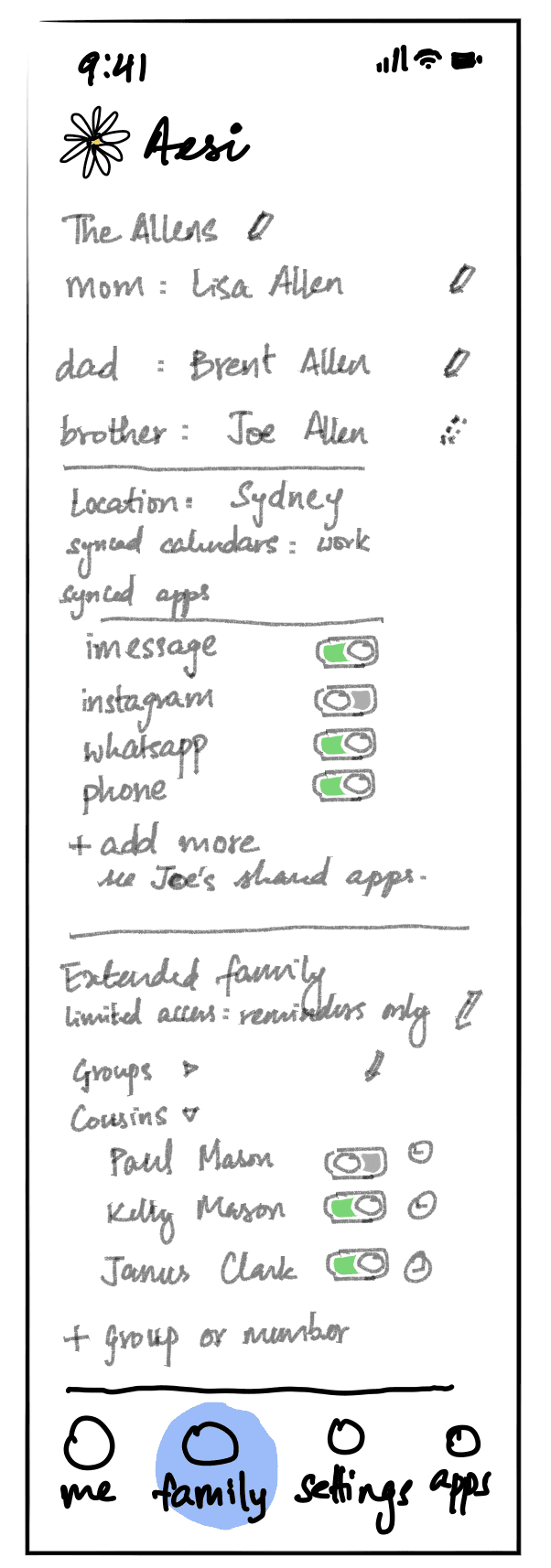

Set-up includes on or off questions answered by a toggle.
The home-screen on start holds an overview of the user’s synced calendar and a toggle to signal availability.


The me tab holds customisations for the user, including the synced apps.


The family tab shows individual preferences for each added family member. It also has toggles for an extended family option.


Settings has options for how the app engages with the user. This includes the frequency of notifications and permission to send texts.
Prototyping
Medium Fidelity Prototype
Set-up includes on or off questions answered by a toggle.
The settings tab is designed to hold control and customisations of a more contextual nature.
This streamlines the earlier feedback on the need for clarity over customisations.
Prototyping
Hi-Fi Prototype
In order to communicate how the assistant is integrated within the user’s phone, scenarios are developed to a higher fidelity.
The widget aspect relating back to availability is explored as is how suggestive and actionable notifications would appear and function.
This also illustrates instances in which the assistant engages with the user.


